Interface Overview
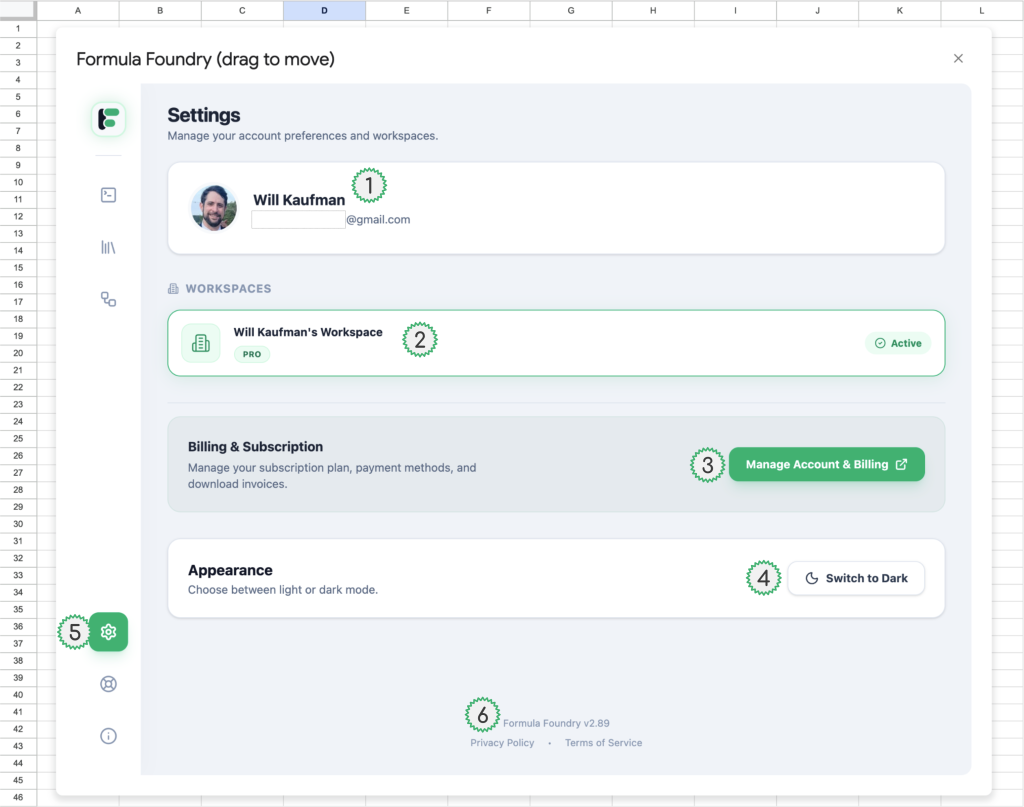
- Account holder details
- Name
- Email associated with account
- Workspace Details
- Workspace title
- NOTE: if a user is a member of more than one workspace, all of them will be listed here
- Subscription type (example in this image: “Pro”)
- Subscription status (example in this image: “Active”)
- Workspace title
- Billing & Subscription Management
- Click the “Manage Account & Billing” button to open Formula Foundry account management portal
- Options within the portal include:
- Teams
- Managing workspace team members
- Send invite
- Resend invite
- Remove user
- Team Capacity
- Managing workspace team members
- Account Snippet Details
- Number of snippets saved
- Limits (depending on account type) on Snippets
- Pro: infinite / unlimited
- Starter: up to 5
- AI Tokens
- Monthly quota of of tokens available
- Pro: 1,000,000
- Starter: limited
- Token Usage
- Monthly quota of of tokens available
- Trial Details
- If trial is active, the number of remaining days will be displayed
- Billing
- Changing (or cancelling subscription)
- My Account
- Deleting account
- NOTE: account can only be done after canceling subscription
- Teams
- Options within the portal include:
- Click the “Manage Account & Billing” button to open Formula Foundry account management portal
- Application Appearance Controls
- Toggle between two appearance options:
- Light Mode
- Dark Mode
- Toggle between two appearance options:
- Navigation to Settings section of the Formula Foundry application
Was this article helpful?
Thanks for your feedback!